What am I looking at?

name mark built from css grid.
nested divs per glyph.

no font files. no svg. no canvas.

Mangle Kuo

Design engineer building intelligent, high-detail web interfaces from ambiguous product direction.

I combine frontend systems depth, interaction judgement, visual sensitivity, and practical AI/web experience. I care about making adaptive websites feel clear, responsive, and alive.

Client, product & experiments

Selected Work

Shipped interfaces, client delivery, and tools where rendering choices, interaction continuity, and performance trade-offs mattered.

  • AI WritingCollaborationInteraction DesignPrototype

    Marginalia

    A collaborative writing surface where the AI co-editor docks beside the draft — rewrite, grammar, and brief stay in the margin so the article never disappears under a modal.

    Marginalia editor with a professional email draft, grammar underlines, and a docked writing assistant panel beside the document
    Click to expand

    Marginalia pipeline: Shared Yjs doc → Long-poll sync → TipTap surface → Grammar + rewrite → Docked AI panel → Model tier

    What it is

    Most AI writing UIs treat the assistant as a takeover: a sheet, a blur, a full-screen chat that asks you to dismiss the draft to finish a thought. Marginalia starts from the opposite question — if you opened help to work on a sentence, why would you want that sentence covered? The assistant lives in the margin; the document stays first-class.

    What I built

    A TipTap + Yjs editor with long-poll sync, locked/editing modes, passive grammar underlines, selection rewrites, thesaurus and block reorder, plus a docked writing assistant with Assist / History / Brief views and Fast / Mid / Advanced model tiers through the AI Gateway.

    Why it was hard

    The hard part was not calling a model — it was keeping assistive chrome useful without stealing the page. Large tools had to push the editor aside; micro-tasks (word rewrite, grammar) could float small near the selection, but never as a second full assistant with a blur scrim.

    Metrics

    Prototype on manglekuo.com/marginalia: in-memory CRDT sync, docked AI panel that keeps the draft readable, model-tier routing for complete / suggest / stitch / task.

    Implementation notes
    • Named the product after the design rule: assistive UI is marginalia — present, useful, and never covering the text it comments on.
    • Seeded a deliberately imperfect client email so grammar, rewrite, and the writing brief have something real to press against on first load.
    • Split AI work into parallel tasks with serialized document applies, so tone / shorten / review passes can run without stomping each other mid-edit.
    • Used Yjs over long-poll rather than WebSockets so the prototype stays deployable as ordinary serverless routes; offline edits merge on reconnect without a conflict UI.
    • Exposed Fast / Mid / Advanced tiers that map each task (complete, suggest, stitch, ai-task) to different Gateway models — latency when drafting, stronger models when revising.
  • Map UXAccessibilityGeospatialProduct

    ssh-ldn

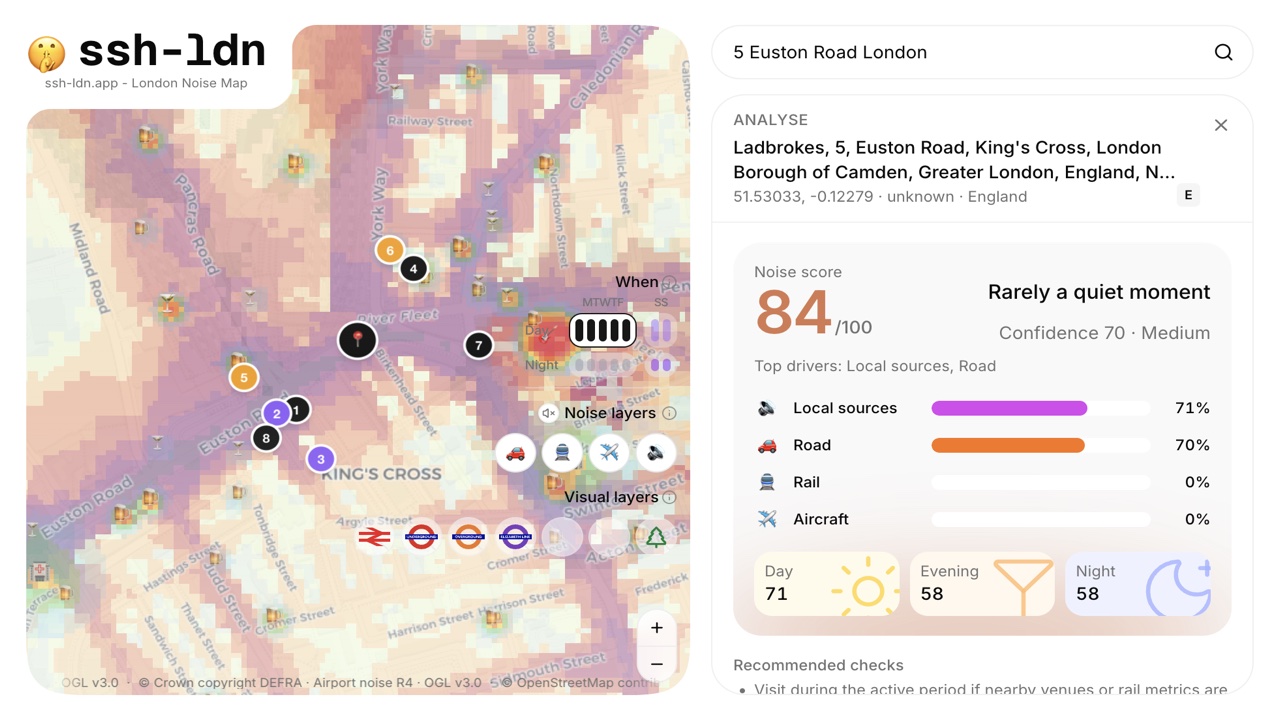
    London noise map for renting, buying, and visiting — search an address, see what actually contributes to sound, and ask follow-ups by voice before move-in day.

    ssh-ldn analysing 5 Euston Road with an 84/100 noise score, source breakdown, and DEFRA heatmap over King's Cross
    Click to expand

    ssh-ldn pipeline: Address / postcode → Geocode → DEFRA + OSM layers → Score + confidence → Map + voice explain

    What it is

    A map product that makes invisible urban sound risks legible. People can already compare commute, crime, and rent; ssh-ldn answers whether a flat is likely to sound quiet — and why — across weekday/weekend and day/night.

    What I built

    The full address-to-explanation flow on Next.js 16 and MapLibre: geocoding, DEFRA road/rail/airport layers, OSM nightlife and venues with time-slot heuristics, a confidence-aware score card, representative ambient preview, ElevenLabs voice Q&A, plus a public noise API and MCP endpoint.

    Why it was hard

    Strategic noise maps are annual averages, not live measurements. The hard part was communicating uncertainty, time-of-day variation, and competing sources without overselling precision — while keeping a dense map UI responsive enough to explore.

    Metrics

    Built in one day at Londonmaxxing 003 (Live London track); live at ssh-ldn.app with search, layer toggles, analyse panel, and voice mode.

    Implementation notes
    • Started from the real gap: commute and rent are searchable; whether a home will sound liveable usually only shows up after moving in.
    • Layered DEFRA Round 4 strategic maps with OSM pubs, clubs, venues, and hospitals so local nightlife can outweigh a quiet road baseline after dark.
    • Froze a score contract early — dominant sources, day/evening/night profile, confidence band, recommended checks — so demo addresses told visibly different stories.
    • Designed accessibility into the product: voice mode describes sound environments in language, not only colour on a map.
    • Shipped a public read-only API and MCP tool so the same address-to-noise explanation can be reused outside the UI.
  • Visual ToolWeb WorkerThree.jsExperiment / Tool

    TSL Dither

    A browser image editor for retro, high-saturation dithering — bright P3 dots on black, per-channel white-noise dithering, and a worker pipeline that keeps sliders responsive.

    Click to expand

    TSL Dither pipeline: Load image → Downsize → Tone map → Canvas preview → Worker dither → Export

    What it is

    A multi-stage editor (Load → Downsize → Tone → Dither → Export) for 8-bit retro dithering pushed toward vivid magenta, yellow, and blue on black — where high-contrast sources let dots float in shadows and read almost like a lidar scan.

    What I built

    The full pipeline UI with canvas previews, staged downscale, and a Web Worker driving tone and dither passes — per-channel white noise before thresholding to dissolve Bayer-grid artefacts while keeping gradients legible.

    Why it was hard

    For a 2D image editor in the browser, the bottleneck is main-thread responsiveness, not shader throughput — CPU thread isolation kept interaction smooth in ways GPU experiments did not.

    Metrics

    Worker-based tone and dither with smooth slider feedback while processing large images.

    Implementation notes
    • Split the editor into stages: Load, Downsize, Tone, Dither, Export, so expensive image work stays understandable and recoverable.
    • Landed on per-channel white noise (independent R/G/B noise, threshold each, recombine) over pure threshold or ordered Bayer dithering.
    • Kept canvas preview separate from Web Worker dithering to avoid blocking interaction while processing megapixel buffers.
    • TSL/WebGPU was the original direction; settled on Three.js canvas plus a worker because thread isolation mattered more for 2D photo editing.
  • ProductionClient WorkStartupMotion UI

    ARC League / GAIB

    Production marketing and product web for GAIB and ARC League — brand-heavy motion, tab systems, and performance-conscious front ends.

    Click to expand

    What it is

    The ARC League launch site and related GAIB product surfaces: hero storytelling, demo reels, event funnels, and marketplace pathways.

    What I built

    Rebuilt landing and app front ends with vector/CSS systems and preprocessing to cut raster-heavy asset weight substantially, plus layout transitions, scroll-bound sections, and state that persists cleanly across navigation.

    Why it was hard

    Shipping polished marketing motion while aligning UI with Web3 wallet timing, RPC latency, and transaction states — without remount-heavy navigation or janky tab switches.

    Metrics

    Reduced raster-heavy asset weight substantially through vector/CSS systems and preprocessing.

    Implementation notes
    • Translated vague founder/stakeholder direction into testable prototypes, then refined them into production-facing React interfaces.
    • Built interaction details including tab/card transitions, scroll-reactive navigation, explanatory side panels, asset table views, and reusable components.
    • Balanced Web3 constraints around client-side wallet state, transaction flows, external data fetching, and user trust.
    • Chose between CSS, SVG, Canvas, Three.js, video, and preprocessed assets depending on performance, visual fidelity, and device support.
  • AI SearchNext.jsSemantic SearchData UX

    as.manglekuo.com

    Semantic search over multilingual RSS feeds — PPR, edge geo, and client-side embedding search with no database dependency.

    Click to expand

    as.manglekuo.com pipeline: RSS feeds → Parse/cache → Embeddings → Client ranking → Progressive results

    What it is

    ArticleSearch aggregates hourly RSS feeds and ranks articles by OpenAI embedding similarity to your query, across topic lanes from astronomy to politics.

    What I built

    Next.js 15 with Progressive Partial Prerendering, edge middleware for locale, parallel feed ingestion, and a virtualized results grid with ~30MB vectors packed to ~7MB for in-browser search.

    Why it was hard

    Compressing high-dimensional vectors for instant client-side cosine matching while keeping 60fps scroll through hundreds of rich article cards and responsive layouts.

    Metrics

    Fast semantic matching with strong Lighthouse performance (98–100 depending on route and test conditions).

    Implementation notes
    • Treated RSS as a structured, machine-readable layer of the web rather than scraping arbitrary pages.
    • Used embeddings for semantic ranking while keeping the interface feeling like a fast article browser, not a slow AI tool.
    • Explored compact embedding transport: roughly 30MB of vectors packed to around 7MB for browser-side search.
    • Designed progressive result refinement so useful content appears early and ranking can improve without the interface feeling blocked.
  • Travel ToolReact 19Server ActionsData UX

    Where's My Flight

    Inbound-aircraft delay tracing with FlightAware — Suspense boundaries, server actions, and leg switching without full reloads.

    Click to expand

    Where's My Flight pipeline: Flight number → Current flight → Tail history → Inbound leg → Delay context

    What it is

    A travel tool that follows the aircraft assigned to your flight number so you can see whether the inbound leg is late before the headline status updates.

    What I built

    A hybrid SSR/CSR app using React 19 `use()` with Server Actions, Suspense for inbound data, and `startTransition` so search and timeline changes stay responsive.

    Why it was hard

    Designing a text-first interface with conditional dimming, historical legs, and streaming inbound details while respecting API rate limits and keeping the story readable under load.

    Metrics

    Lighthouse 100 Performance/SEO.

    Implementation notes
    • Split the interface between server-rendered structure and client-side flight interaction so useful content appears early.
    • Used React 19 `use()`, Server Actions, Suspense boundaries, and `startTransition` to keep timeline/search interactions responsive.
    • Designed around real user stress behaviour: checking inbound aircraft, historical legs, and delay context before official status changes.
    • Kept the interface text-first and readable despite API latency, rate limits, and conditional flight data.

Experiments

Showcase

Smaller component studies and interaction experiments — separate from the work above.

Browse all